Smart Homes Enhance Senior Safety Through Android and Medical Alerts
 Posted On
As populations age, home technology is changing the way families and caregivers support older adults. Intelligent home systems paired with Android devices and medical alert tools create a layered approach to reduce risk and keep daily life predictable. This article walks through practical steps and real examples that readers can use right away.
We cover how connected homes can lower the chance of falls, how Android phones and tablets can work as control centers, and how modern medical alert devices tie into routines. Expect tips for setup, privacy guidance, and advice for choosing devices that match a person living preferences and health needs.
How connected homes reduce risk for older adults
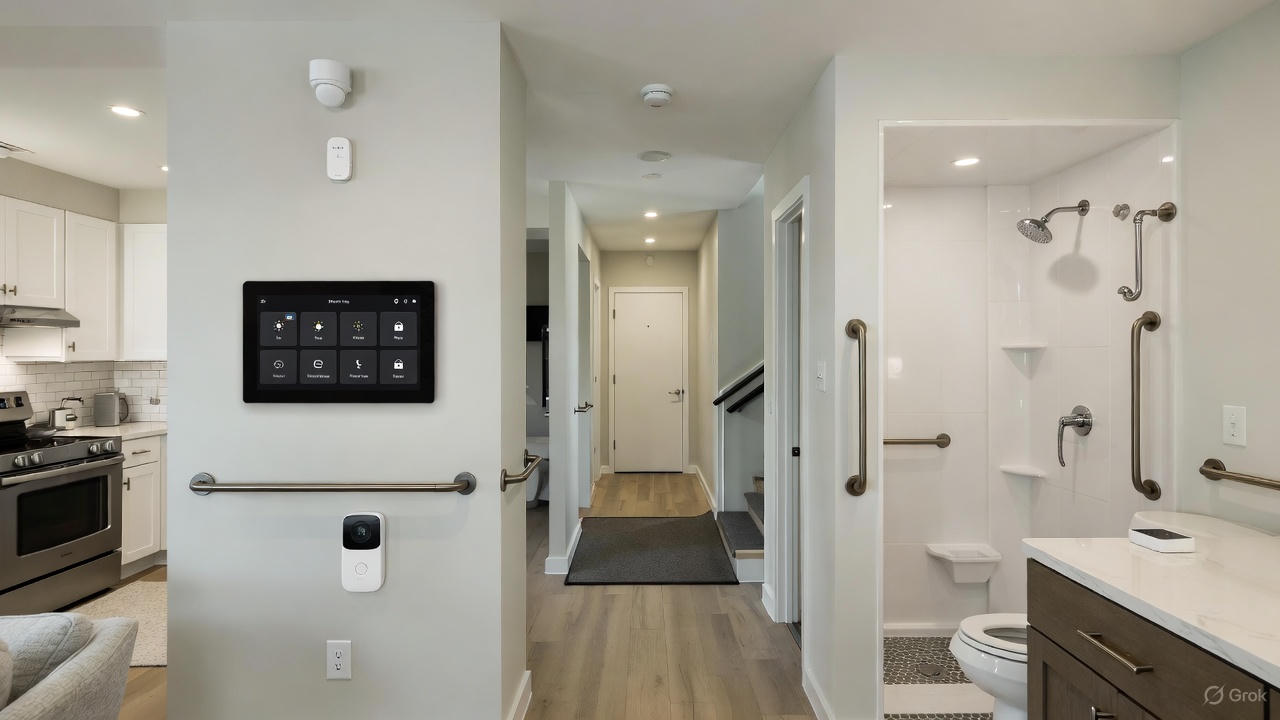
Connected homes use sensors and networked devices to monitor conditions in the home and communicate with caregivers or emergency services when something unusual occurs. A few common benefits include earlier detection of incidents and fewer daily hazards that can lead to injury.
- Motion sensors can detect lack of movement and send alerts if an expected activity does not occur during certain hours
- Smart lighting replacements provide consistent illumination across hallways and bathrooms which lowers trip hazards during night hours
- Temperature and water leak sensors warn of environmental risks before they create emergencies
These measures work best when they are unobtrusive. For example a motion sensor near the bedroom door and a night light that turns on automatically when the person gets up reduces fall risk without requiring the person to push a button.
Android devices as central control hubs for daily monitoring
Android phones and tablets can act as central points for controlling home devices and for receiving alerts. Many seniors already use Android hardware which makes integration easier than introducing an unfamiliar gadget.
Setting up an Android device for monitoring
Choose a dedicated tablet or phone to run the home control apps. Create a simplified home screen with large icons and use app shortcuts for key functions such as emergency call, medication reminders, and live video with a caregiver. Remove or hide apps that can cause confusion.
Recommended app features and configurations
Look for apps that offer scheduled check ins, two way calling, and remote control of basic home functions. Configure location permissions so that an authorized caregiver can review activity when needed. Set up automatic updates only when the device is idle to avoid interruptions.
Medical alert systems and how they integrate with home technology
Medical alert systems remain the primary line of defense when a medical event occurs. Newer models offer more than a single panic button and can connect with sensors in the home. Integration with an Android device helps caregivers receive notifications quickly and to confirm situations with live audio or video when appropriate.
Key features to look for in medical alert devices
Essential features include fall detection, GPS for location if the person leaves the house, and waterproof pendants for safe wear in the shower. Check battery life and test emergency connection paths so families know whether alerts go to a monitoring service, designated contacts, or both.
How integration improves response
When medical alerts are linked to the connected home network push notifications can include context such as the last known motion sensor activity or door sensor status. That additional data helps caregivers judge the urgency and make informed decisions quickly.
Practical installation and configuration tips for caregivers
Install devices with usability in mind. Place motion sensors at hip height to better detect falls and configure door sensors near common exit points. Use color coded labels on devices and a short setup guide that lists what each device does and how to reset it.
- Perform a full system test at least once a month
- Create a short instruction card with photos and keep it near the main entrance
- Set volume levels for alerts to be audible but not startling
For caregivers who manage multiple homes consider using an Android tablet with a dedicated app that groups properties for quick oversight. This reduces the time spent switching between accounts and keeps critical information in one place.
Privacy and security considerations for connected systems
Any networked device introduces privacy and security questions. Use strong, unique passwords for device accounts and activate two factor authentication where available. On local networks create a guest network for devices that do not need direct access to personal computers and files.
Firmware updates are important and should be scheduled regularly to address known vulnerabilities. If video cameras are part of the setup pick models that support encrypted streams. For caregivers, limit remote access to trusted individuals and record access logs to track changes.
Choosing the right combination of devices and services
Select devices based on the daily routine and specific health risks of the older adult. For someone at high risk of falls focus on fall detection pendants, night lighting, and motion sensors. For someone with memory issues prioritize medication reminders and door sensors that alert if the person leaves the home unexpectedly.
Cost matters and subscription services can add up. Compare monthly monitoring fees against the cost of local caregiver visits. For families willing to manage alerts directly, subscription free systems that notify family members by smartphone may be a better match.
For more reading about integrated options visit senior safety solutions and review case studies and device lists that match different needs and budgets.
Real life examples and practical outcomes
Case example one involves an older adult who had a gentle fall in the bathroom late at night. A combination of a motion activated night light and a wearable alert pendant triggered a call to a family member who arrived and found the individual safe with a minor injury. The incident required only a brief check in and a follow up doctor visit.
Case example two features a home with door sensors and a schedule based reminder system. When the person with early memory loss left the home at an unusual hour an alert notified a caregiver who spoke with them through a tablet and guided them back safely. The caregiver then adjusted medication reminders and added a second sensor to the main exit.
These examples show how layered systems reduce the need for emergency services and lower the stress on family caregivers. They also show that relatively simple changes to the home can lead to measurable improvements in daily safety.
Budget friendly approaches that still offer protection
You do not need to buy the most expensive hardware to improve safety. Start with a wear only medical alert device and a reliable Android tablet for alerts and calls. Add motion sensors and night lights over time. Prioritize devices with long battery life and clear support documentation.
- Buy refurbished or open box devices from reputable sellers
- Look for bundles with monitoring included for a trial period
- Check community programs and non profit grants that subsidize medical alert purchases for low income seniors
Small incremental upgrades spread across months are easier to manage and allow time to see what features deliver actual value in daily life.
Conclusion
Connected homes paired with Android devices and medical alert systems offer practical and measurable ways to reduce risk for older adults living at home. They make it easier to detect incidents early and to coordinate help quickly when it is needed. Start with a simple setup such as a wearable alert and an Android tablet configured for easy access and grow the system according to observed needs. Test all devices regularly and keep privacy and security practices up to date.
If you care for an older adult begin by listing top daily risks and selecting two devices that address those risks directly. Try them for a month and track any changes in incidents and response times. If you need help deciding what to buy collect model numbers and usage patterns then ask a trusted tech friendly caregiver or a community program for recommendations. Taking these steps reduces anxiety for families and improves day to day safety for the person living at home. Act now to review current devices, update passwords, and run a full test to confirm that alerts reach the right people when they are needed.